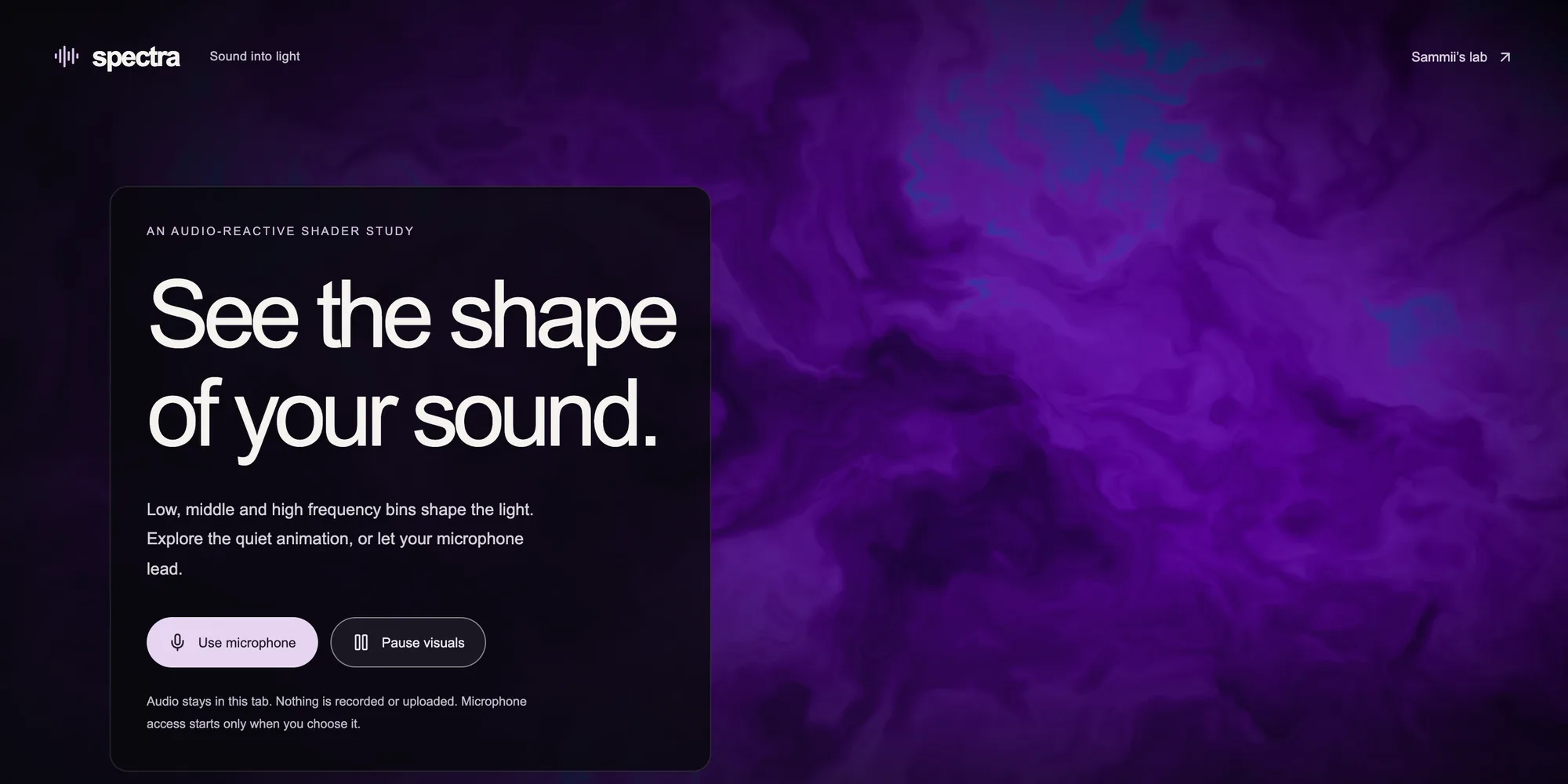
What it is
Spectra turns sound into light. A Web Audio analyser reads the spectrum of your microphone, three numbers come out of it, and those three numbers drive a fragment shader: the low end warps the field, the middle shifts its colour, the top end scatters a fine shimmer over it.
It is at spectra.sammii.dev.
The shader is the part that looks good in a recording. The part I spent the most care on is the microphone. A page that asks for a microphone takes on responsibilities: ask only when someone chooses to, say clearly what is happening, and let go of the device properly when they stop. Spectra opens with the visuals paused and no permission requested, offers a silent preview that never touches audio, and treats "pause the visuals" and "stop the microphone" as two different things, because they are.
From spectrum to three numbers
The analyser is set up with an FFT size of 512 and the Web Audio default style of smoothing:
analyser = context.createAnalyser();
analyser.fftSize = 512;
analyser.smoothingTimeConstant = 0.8;
source.connect(analyser);
const buffer = new Uint8Array(analyser.frequencyBinCount);
An FFT of 512 samples gives 256 frequency bins. Each bin is sampleRate / 512 wide, so at a 48 kHz sample rate a bin covers 93.75 Hz, and the whole array runs from 0 up to 24 kHz. getByteFrequencyData fills it with values from 0 to 255, each a decibel level scaled between the analyser's minimum and maximum. The 0.8 smoothing constant means each reading is already blended with the previous one by the analyser before my code sees it.
Then the array is cut into three groups:
export function frequencyLevels(raw: Uint8Array): AudioLevels {
  const bassEnd = Math.floor(raw.length / 8),
    midEnd = Math.floor(raw.length / 2);
  const mean = (from: number, to: number, scale: number) => {
    if (to <= from) return 0;
    let sum = 0;
    for (let i = from; i < to; i++) sum += raw[i];
    return Math.min(1, Math.max(0, sum / (to - from) / scale));
  };
  return {
    bass: mean(0, bassEnd, 200),
    mid: mean(bassEnd, midEnd, 180),
    high: mean(midEnd, raw.length, 160),
  };
}
With 256 bins, that is bins 0 to 31, 32 to 127 and 128 to 255. At 48 kHz those are roughly 0 to 3 kHz, 3 to 12 kHz and 12 to 24 kHz. The split is linear in bins, which means the "bass" group is much wider than musical bass: it holds voices, most instruments and their lower harmonics. That is why the interface calls them Low, Mid and High rather than bass and treble, and why the README says plainly that these are relative visual bands, not calibrated frequency or loudness measurements.
Each group is a mean, divided by a scale and clamped to one. The divisors get smaller as the bands go up, 200, 180 and 160, so the upper groups, which usually carry less energy, can still reach the top of their range. The guard on to <= from means a tiny buffer returns silence instead of dividing by zero.
Attack and release
Those levels arrive once per animation frame. Fed straight into the shader they would flicker, so the render loop eases towards them, quickly on the way up and slowly on the way down:
for (const band of ["bass", "mid", "high"] as const)
  smooth.current[band] +=
    (audio[band] > smooth.current[band] ? 0.18 : 0.05) *
    (audio[band] - smooth.current[band]);
This is an exponential follower with two rates. Each frame closes 18% of the gap when the sound is louder than the current value and 5% when it is quieter. The remaining gap after n frames is (1 - k)^n, so the half-life is ln 0.5 / ln(1 - k): about three and a half frames on the attack and about thirteen and a half on the release. A drum hit blooms almost immediately and fades over a moment, which is how a light responding to sound feels right. It is the same asymmetry a compressor or a VU meter uses.
One honest note: the rates are per frame, not per second. Shader time in the same loop is driven by real elapsed time, clamped to 50 ms a step, but the follower is not, so on a display that refreshes faster the response is a little quicker. For a visual study I chose the simpler line.
Where the three numbers go
The fragment shader is a domain-warped simplex noise field. fbm sums five octaves of 3D simplex noise, doubling the frequency and halving the amplitude each time, and domainWarp feeds fbm into itself twice, offsetting the sample position by the result of the previous pass. The strength of that offset is where the low band goes:
float warpStrength = 0.8 + uBass * 2.4;
vec3 warp = domainWarp(uv * 1.8, t, warpStrength);
float n = warp.x * 0.5 + 0.5;
float hue = uMid * 0.35;
vec3 col = palette(n, hue);
col *= 1.0 + uBass * 0.6;
In silence the warp sits at 0.8, enough to keep the field folding slowly. With a strong low end it reaches 3.2, and the shapes tear and curl. The low band also lifts brightness by up to 60%. The middle band slides the palette lookup by up to 0.35, which moves the field along a ramp from near-black purple through violet and electric blue to cyan and white. Inside palette, the shifted lookup value is raised to the power 1.6, which biases ordinary noise values towards the purple end, so the blue and white only arrive at the peaks.
The high band is the shimmer: a second, much finer noise at twelve times the scale and a fast time step, thresholded with smoothstep(0.3, 0.9, ...) so only its peaks show, and added in a pale blue in proportion to uHigh. Sibilance and cymbals sparkle across the surface without changing its shape. A vignette and a mild gamma finish it.
The bug that the meters were hiding
The first version, from March, kept the audio levels in a ref inside the hook and returned them like this:
return { audioData: audioDataRef.current, isActive, error, start };That is a snapshot. The hook updated its ref on every animation frame, but the component only saw a new value when it re-rendered. The canvas then copied that value into its own ref in an effect after each render. Nothing about the audio caused a render. What did was the level meters: every sixth frame the render loop called setMeters, which re-rendered the component, which picked up a fresh snapshot. The shader was hearing the microphone only because the meters happened to ask React to draw.
The fix was to stop passing values and pass a reader. The audio session keeps its current levels in a closure and exposes read: () => levels. The render loop calls read() every frame and the meters poll it every 100 ms, independently. There is a test named for the point: frequency reads stay live without needing a React render.
A session with a lifecycle
That first version also had no way to stop. It acquired the microphone, created an AudioContext, and on unmount stopped the tracks but never closed the context. Errors showed the browser's raw message. The released version moves all of it into a session object with explicit states, idle, starting, active and error, and one function that releases everything:
const release = () => {
  if (frame !== null) env.cancelFrame(frame);
  frame = null;
  source?.disconnect();
  source = null;
  analyser?.disconnect();
  analyser = null;
  stream?.getTracks().forEach((track) => track.stop());
  stream = null;
  if (context) void context.close().catch(() => {});
  context = null;
  levels = SILENCE;
};
Stopping the tracks is what turns off the browser's recording indicator. Closing the context frees the audio graph. Resetting the levels to silence means anything still reading gets zeros rather than the last loud moment.
The subtle part is time. getUserMedia can take as long as a person takes to read a permission prompt, and someone can press Stop, or leave the page, while it is open. Each start takes a generation number, and every await checks it is still current:
const acquired = await env.getStream();
if (attempt !== generation) {
  acquired.getTracks().forEach((track) => track.stop());
  return false;
}
If permission arrives after Stop, the stream is released immediately and never connected. A second start while one is pending returns the same promise, so a double click cannot acquire the microphone twice. Failures are mapped by their DOM error name into sentences that say what to do next: blocked access points to the browser's settings, a missing device asks you to connect one, a busy device suggests another app may be using it. The error path calls release() first, so a failure after the stream was acquired still gives the microphone back. The session takes the browser as a parameter, its stream, context and frame scheduler, so the tests can drive all of this with fakes and never ask for a real microphone.
Silent preview, pause and stop
The interface has two buttons and keeps them honest. Use microphone asks for audio and, if it succeeds, starts the visuals. Play silent preview runs the shader on time alone, with all three levels at zero, and never requests a device. Pause visuals stops the render loop but leaves the microphone running, and the meters keep moving so you can see it is still listening. Stop microphone releases the device and leaves the visuals running, so the field eases back to its ambient state over the release curve instead of freezing.
The status line spells out the combination: microphone on with visuals playing or paused, silent preview with no audio input, or ready with the animation paused. The copy under the buttons says audio stays in the tab and nothing is recorded or uploaded, which is true by construction: there is no server and no model, just an analyser node.
When WebGL is not there
The renderer is created inside a try. If WebGL is unavailable, the controls are replaced by a short explanation and the microphone is never offered, because there would be nothing for them to drive. If the context is lost later, the handler marks the stage as unavailable, stops the visuals and stops the microphone too. A page that can no longer show you anything should not keep listening.
Light and dark
Spectra follows the visitor's colour scheme, and the light version needed an idea rather than a palette. The shader is a dark art stage, and a pastel noise field on white loses everything that makes it glow. So in light mode the page becomes lavender paper and the stage becomes a rounded window cut into it, between the header and the footer. The canvas still fills the viewport underneath. The window is made by a single box shadow on the content area:
box-shadow:
  0 0 0 1px rgba(28, 22, 33, 0.14),
  0 0 0 100vmax var(--page);
A shadow with no blur and a spread of 100vmax paints the page colour outward far enough to cover the rest of the viewport, and the rounded corners of the box shape the hole. The dark veil gradients that sit over the shader in dark mode are switched off, and the stage keeps a near-black background behind the canvas.
What it taught me
Spectra taught me that an audio visualiser is mostly a lifecycle problem with a shader attached. The maths is small: a linear split of 256 bins, three means, a two-speed follower. The care is in the edges: a permission prompt that resolves after you have changed your mind, a context that needs closing, a pause that should not mean stop. And the March bug is the one I think about most, because it worked. The visuals responded, the meters moved, and the only reason was a side effect of a component re-rendering for something else.