The problem
Photoshop already does everything this workflow needs: grayscale conversion with proper tonal control, threshold-based background knockout with feathered edges, export at 300 DPI across a set of predefined sizes. What it isn't good at is doing that same sequence twenty times in a row. Batch work is slow, and the licence is expensive. So I built ScapeStudio, a browser-based editor purpose-built for this pipeline, with the actual pixel processing kept off the main thread so the interface never locks up while it works.
The worker pipeline
All image processing runs in a dedicated Web Worker using OffscreenCanvas. The main thread hands the worker the source image and the current parameter values; the worker runs the full pipeline, grayscale conversion, curves adjustment, threshold knockout, and returns the processed result. That keeps the UI responsive even on large files: dragging a curves handle kicks off a new pipeline run without blocking scrolling or button clicks elsewhere on the page.
OffscreenCanvas support was inconsistent across browsers at the time this was built, so the worker checks for it and falls back to transferring plain ImageData arrays when it isn't available. The fallback path loses the GPU-accelerated canvas operations, which makes it slower, but the output is functionally identical either way.
Non-destructive editing and the curves tool
Nothing in the pipeline touches the original image data. Each stage reads from the previous stage's output buffer, and changing a single parameter only reruns that stage and whatever comes after it, not the whole chain from scratch.
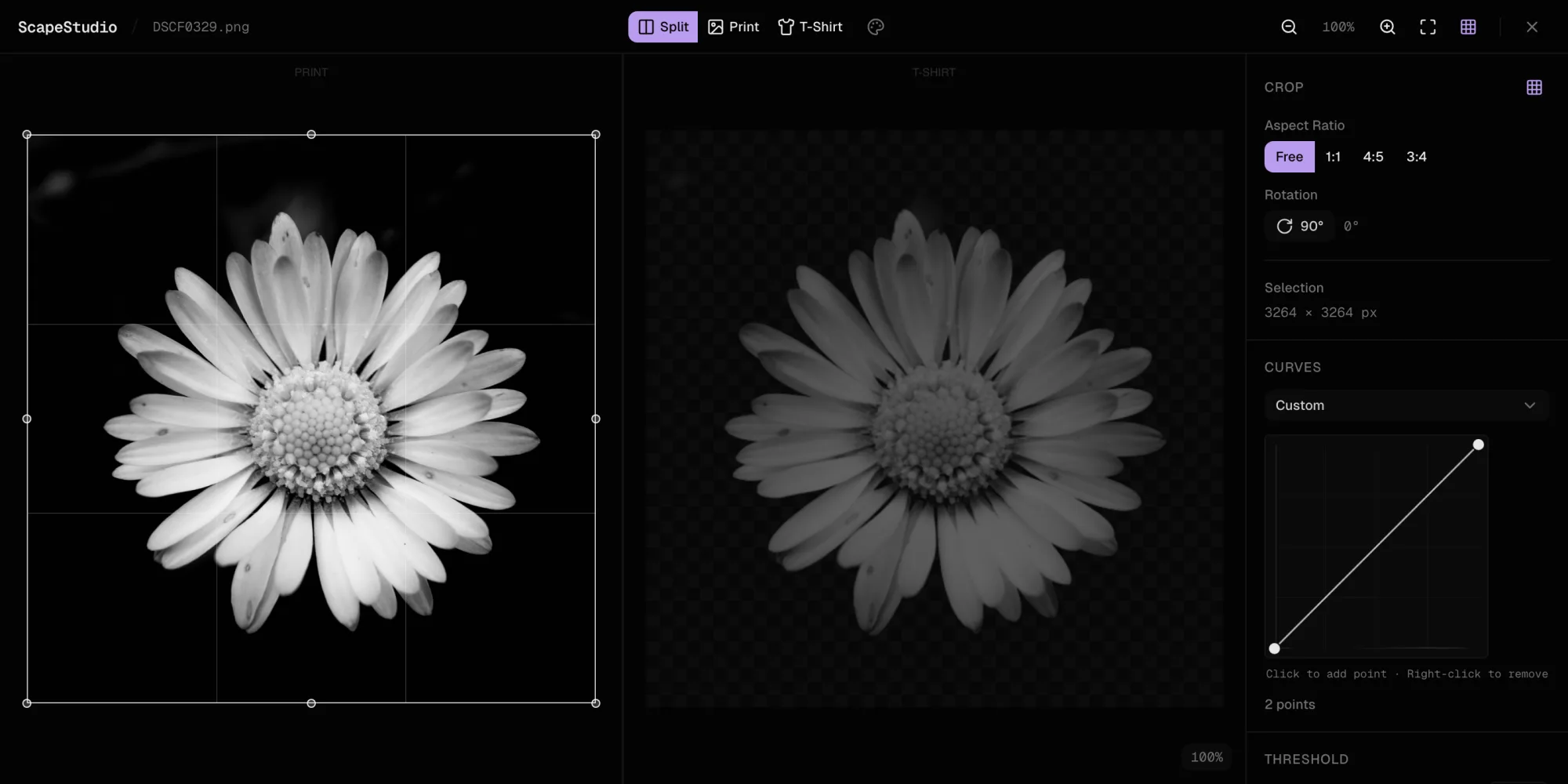
The curves adjustment is a cubic spline interpolated from user-placed control points and evaluated per pixel against the luminance channel. Getting it to feel like Photoshop's curves tool meant using Catmull-Rom splines through the control points, clamped to the 0-255 range, with a real-time preview as you drag. The awkward part was the spline overshooting at extreme control point positions; fixing that required adding tension parameters.
Threshold knockout and feathering
The knockout system converts the image to pure black and transparent based on a luminance threshold. A feather control then runs a gaussian blur over the alpha channel after thresholding, which turns a hard pixel boundary into a soft edge. That distinction matters: hard edges look unnatural on fabric, so feathering isn't a cosmetic option here, it's what makes the t-shirt output usable.
State, preview and export
State, including undo/redo history, is handled with Zustand. A dual split preview makes a before/after comparison always one glance away.
Export takes the processed image and renders it at several predefined sizes, A4, A3, A2, and square crop variants, all at 300 DPI. Every size is generated in the worker, compressed as PNGs, and packed into a single zip via JSZip for download. Large source files complicate this step: an 8000x6000 image straight off a DSLR produces multiple full-resolution buffers as it moves through the pipeline, which can push a browser tab toward running out of memory. The worker explicitly nulls intermediate buffers after each stage and calls garbage collection hints to keep that in check.
Outcome
ScapeStudio handles the full print preparation workflow in the browser. A typical batch of twenty photographs can be processed, checked against the split preview, and exported across every predefined size in under five minutes, with no server involved anywhere in the pipeline.