Why a motion workshop
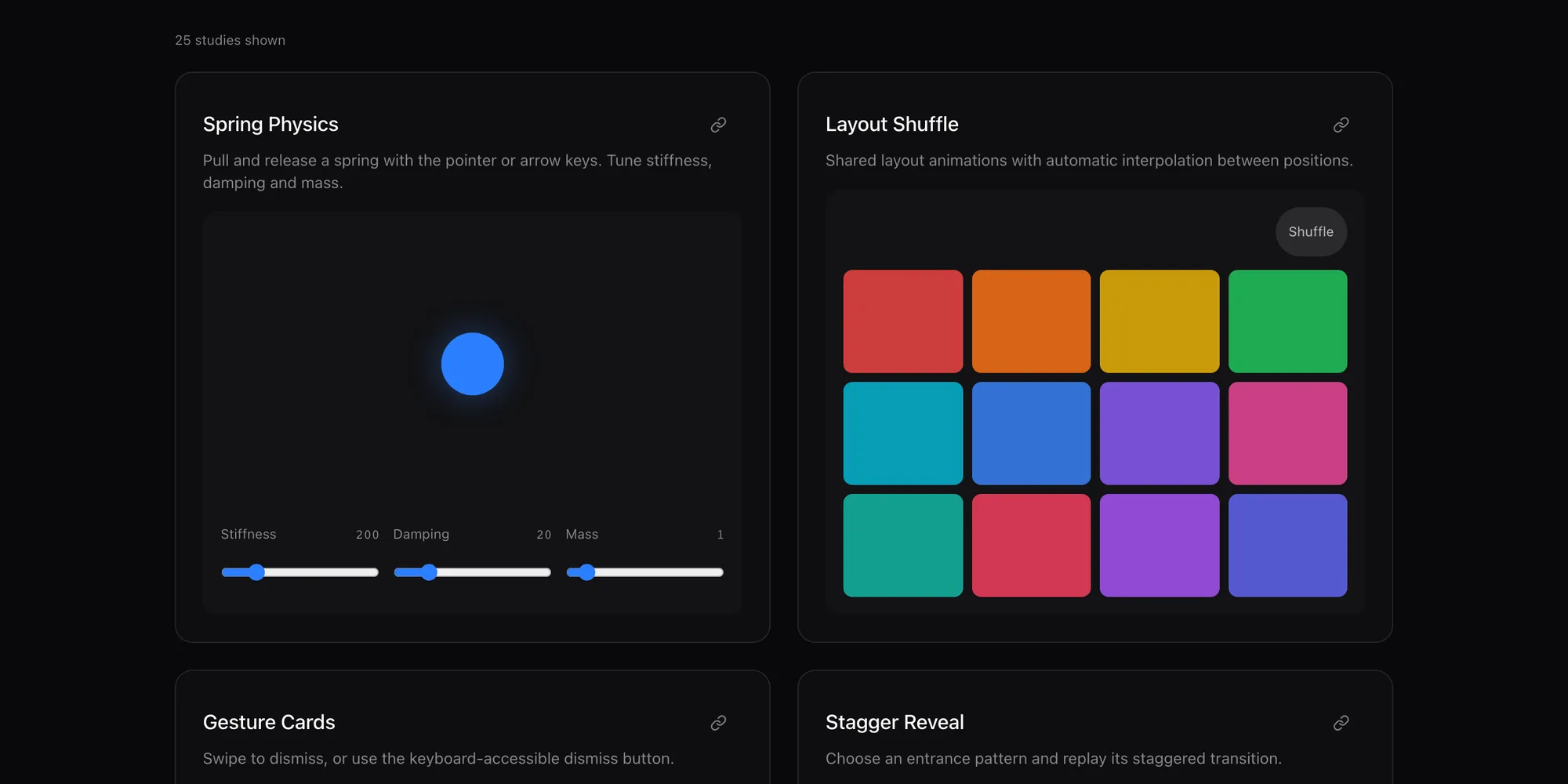
Kinetic is where I go to work out how a movement should feel before it goes anywhere near a product. It is twenty-five small studies on one page: a spring you can pull, tiles that shuffle, cards you swipe away, shapes that morph, a dock that swells under the pointer, layers that drift as you scroll. Each one is a single component that does one thing, so when I want to remember how a shared layoutId behaves or what damping of 30 feels like against 20, I can open the file and read it in a minute.
You can try it at kinetic.sammii.dev.
Most of the studies were built in a single day in March, and the git history from that day is a list of small corrections: a countdown that settled too slowly, a dock that jittered, a morph that did not morph, cards that only flew off to the right. Those corrections are the most useful part of the project, so most of this page is about them.
A catalogue that is data
The page knows nothing about animation. The titles, descriptions and categories live in one array, and the gallery filters it:
const shown = items.filter(
  (item) =>
    (category === "All" || item.category === category) &&
    `${item.title} ${item.description}`
      .toLowerCase()
      .includes(query.toLowerCase().trim()),
);
Each study belongs to one of four categories, Physics, Visuals, Interactions or Timing, and the category buttons are built from whatever categories the data contains, so adding a study never means touching the filter. Every card has a heading id and a link icon pointing at its own anchor, so a single study can be shared directly.
Mounting on approach
Twenty-five live animations on one page is a lot of work for a browser to do at once, most of it for studies nobody is looking at. So each card holds back its demo until you get close:
const viewed = useInView(ref, { once: true, margin: "200px" });The 200px margin starts the demo slightly before the card reaches the viewport, so by the time it is on screen it is already running. Until then the stage shows a quiet line of text. once: true is a deliberate choice: a study you have scrolled past stays mounted, so scrolling back up never resets a spring you were halfway through tuning.
This turned out to matter for the colour scheme as well, which I come back to below.
The countdown that was not a clock
The countdown ring has three duration buttons, 5, 10 and 30 seconds. The first version drove the ring with a spring:
const progress = useSpring(1, { stiffness: 50, damping: 20 });Start set the spring to 1 and then to 0, and the ring and the number in the middle both read from it. It looked right. It was not a timer. A spring's timing comes from its stiffness, damping and mass, and none of those knew about the chosen duration. With Framer Motion's default mass of 1, stiffness 50 gives a natural frequency of √50, about 7.07, and a damping ratio of 20 / (2 × √50), about 1.41. Anything above 1 is overdamped: no overshoot, and a long slow tail as it creeps towards zero. Whichever button you pressed, the ring emptied in the same couple of seconds.
The same afternoon I noticed the tail and fixed it with restDelta: 0.005, which tells the spring to stop once it is that close to rest. That fixed the symptom I could see and left the real problem in place: the duration buttons only changed the number the countdown started from.
The version that is live now treats it as what it is, a clock. Start records performance.now(), and every 50ms the ring asks a pure function where it should be:
export function countdownAt(
  durationSeconds: number,
  startedAt: number,
  now: number,
) {
  const total = Math.max(0, durationSeconds * 1000);
  const remaining = Math.max(
    0,
    Math.min(total, total - Math.max(0, now - startedAt)),
  );
  return {
    seconds: Math.ceil(remaining / 1000),
    fraction: total ? remaining / total : 0,
    complete: remaining === 0,
  };
}
Because the answer comes from elapsed time rather than from counting ticks, a throttled background tab catches up as soon as it gets a tick: the ring jumps to where it should be instead of drifting. The progress value is written with progress.jump(), not set(), so nothing animates between readings, and the ring's stroke offset and the displayed seconds are both transforms of that one value. A clock before it starts reads full, and a clock long past its end reads complete. The tests pin those edges down: half of a ten-second countdown at five seconds, one second left at 4.999 seconds into five, and a thirty-second countdown checked thirty-nine seconds after it started still reporting complete.
What I took from it: a spring is a lovely way to get from one value to another, and a terrible way to measure time.
Springs you can feel
The first study is a ball on a spring. Three sliders set stiffness (10 to 1,000), damping (1 to 100) and mass (0.1 to 10), and the ball follows two useSpring values driven by the drag offset. When you let go, the target snaps back to zero and the spring does the rest. A dashed line from the anchor to the ball makes the stretch visible.
It also works without a pointer. Arrow keys pull the target 20px at a time, clamped so it cannot leave the stage, and Enter or Space releases it:
x.set(Math.max(-100, Math.min(100, x.get() + dx)));
y.set(Math.max(-70, Math.min(70, y.get() + dy)));
The cursor trail is the same idea used twelve times. Each dot gets a slightly softer spring than the one before it:
const springConfig = { stiffness: 200 - index * 10, damping: 20 + index * 2 };Lower stiffness makes later dots slower to respond, and higher damping stops them overshooting, so the trail stretches out behind a fast movement and gathers up again when you stop. There is no delay or queue of past positions anywhere: the lag is entirely in the springs.
Morphing a path
Morphing Shapes moves between a circle, a star, a blob, a hexagon and a diamond. The first version wrote each shape the natural way: the circle as an arc, the star and hexagon as straight L lines. Framer Motion interpolates a path by pairing up the numbers in the two strings, so shapes written with different commands and different numbers of points have nothing to pair. The fix was to write every shape in the same vocabulary, cubic Béziers:
// All shapes use exactly 8 cubic bezier segments for smooth morphingTwo tricks make that possible. A straight line can be written as a cubic whose control points sit on its own endpoints, so the star's edges become segments like C100,10 120,75 120,75. And a shape that needs fewer segments can pad itself with segments of zero length: the circle is drawn in four real curves, then four more that all sit at the point 100,20. During a morph those padding segments unfold into whatever the other shape needs.
One honest note: the comment is not quite true. The star has nine segments, 56 numbers against everyone else's 50. Framer Motion will blend from a longer list into a shorter one, so leaving the star morphs, but it will not blend from 50 numbers into 56. It falls back to an instant change, so arriving at the star is a cut while its colour still springs. It is a good reminder that this kind of morph depends entirely on counting.
Measuring something that moves
The floating dock magnifies icons near the pointer, like the macOS dock. The first version measured each icon's distance from the pointer with getBoundingClientRect(). The trouble is that the icon it measured was the one being scaled: as an icon grew, its centre moved, which changed the distance, which changed the scale. The result was a jitter.
The fix was to stop measuring the thing that moves. Each icon's centre is now worked out from its index and the dock's left edge, which only changes on resize or scroll:
const stableCenter =
  dockLeft + dockPadding + index * (BASE_SIZE + dockGap) + BASE_SIZE / 2;
Distance maps to size between 44 and 56px over a 100px radius, through a stiff spring. The same fix changed scale to real width and height, so the neighbouring icons make room instead of being overlapped. Each icon is a button now, and focusing one sets the shared pointer value to its centre, so tabbing along the dock swells it exactly as hovering does.
Keyboard control of each demo
Most studies can be played without a pointer, and each one needed its own answer to what "keyboard" means for it:
- Tabs use a roving tab index: only the selected tab is in the tab order, and Left, Right, Home and End move between them, wrapping at the ends.
- Drag to Reorder has up and down buttons on each row. The move is a small pure function that returns a new array and refuses to move past either end, and after the move the row is focused again on the next animation frame, once React has put it in its new place.
- Gesture Cards has a "Dismiss top card" button alongside the swipe, and announces how many cards remain.
- 3D Flip Cards are buttons with
aria-pressed, and whichever face is turned away is hidden from assistive technology. - Layout Shuffle opens a tile into an overlay that takes focus and closes on Escape, returning focus to the tile it came from.
The gesture cards carry one more fix from that first day. The exit animation always sent a dismissed card to x: 300, so a card swiped left turned round and flew off to the right. Now the drag handler sets the direction from the swipe before dismissing:
const direction = info.offset.x > 0 ? 1 : -1;
x.set(direction * 300);
Authored physics
Not everything here is a spring. Gravity Balls drops five balls at a time, and each fall is a keyframe sequence: from the top to the floor, up to 25%, down, up to 10%, down, up to 3%, and settle. Squash and stretch run alongside it, flattening each ball on impact and less with each bounce. The physics is in the easing: every fall uses [0.55, 0, 1, 0.45], which starts slow and accelerates like something falling, and every rise uses [0.33, 1, 0.68, 1], which leaves fast and slows to the top of the arc. It is choreography that reads as gravity, and it sits next to the real springs as a useful contrast.
Light and dark
The page follows the system colour scheme. Most of that is ordinary CSS: colours are tokens on :root, the dark values are the original palette, and a prefers-color-scheme: light block swaps in a zinc page, white cards and deeper accents. Even hue-based colours go through a token, so a ball coloured hsl(${hue}, 70%, var(--tone-60)) drops from 60% lightness to 48% on a pale page.
The awkward cases are colours that Framer Motion animates. It can only interpolate values it can read, so a drag shadow or an overlay scrim needs a real colour, not a CSS variable. For those few studies, a small hook reads the scheme:
export function useLightScheme() {
  return useSyncExternalStore(
    subscribe,
    () => window.matchMedia(QUERY).matches,
    () => false,
  );
}
useSyncExternalStore subscribes to the media query, so changing the system setting updates a study that is already on screen. The server snapshot says dark, which would normally risk a flash of the wrong colour on first paint. Mounting on approach removes that risk: these demos only render on the client, after the card comes into view, so their first render already reads the real scheme.
Reduced motion
The whole gallery sits inside a MotionConfig. By default it follows the system's reduced-motion setting, and a "Reduce movement" button forces it on for anyone who wants calmer studies without changing their system settings. The studies stay available either way; the point is to let you choose how much moves.
What it taught me
Kinetic is a sketchbook, and the useful lessons came from the corrections rather than the first drafts. A spring is not a clock. A morph is only as good as its point count. Measuring an element you are also resizing feeds back on itself. And a study only counts as finished when the keyboard has an answer too, because each interaction needs its own idea of what a key press should mean.